NOTE:
This query
remains for backward compatibility but an Image
Document Search is the preferred method.
NOTE:
This query
remains for backward compatibility but an Image
Document Search is the preferred method.
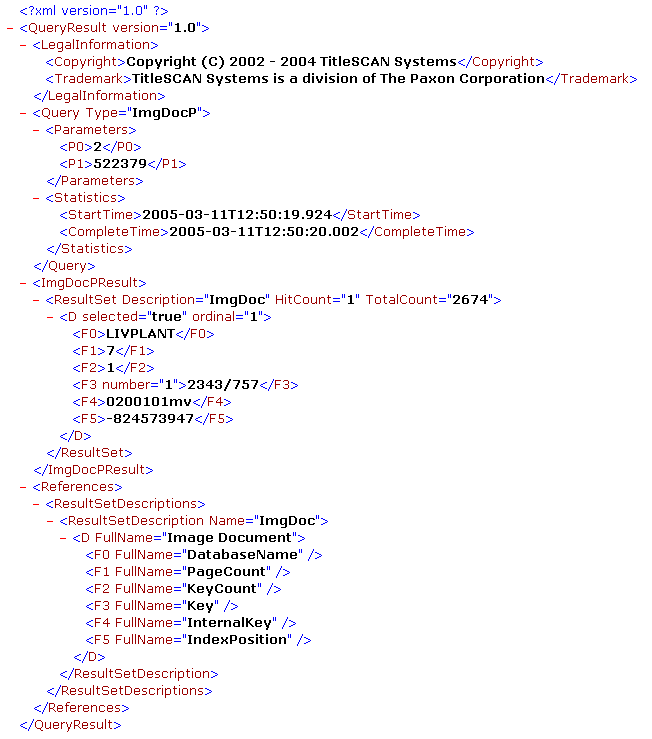
Use this query type to retrieve image document information for plant records with an associated image document. If the value of the ImageAvailable flag for a GI or PI record is ‘Y’, an image document is available and information can be retrieved using this query type with the RecordNumber parameter set to the value of the RecordNumber field in the GI or PI document.
|
Parameter |
Value(s) |
|
Subsystem |
GI='1' |
|
RecordNumber |
Plant document record number |
 IMPORTANT:
The UserName,
UserCompany, and UserPassword parameters shown in the sample query below
are example values only and will not work. If
you are developing software that uses the TitleSCAN Direct Access Option
and wish to test that software using the TitleSCAN Web demonstration site
at http://tsweb.titlescan.com, contact TitleSCAN Systems to obtain an
account on that system. When
you obtain the account, you will be given UserName, UserCompany, and UserPassword
values. Substitute
those values in the Query string below.
IMPORTANT:
The UserName,
UserCompany, and UserPassword parameters shown in the sample query below
are example values only and will not work. If
you are developing software that uses the TitleSCAN Direct Access Option
and wish to test that software using the TitleSCAN Web demonstration site
at http://tsweb.titlescan.com, contact TitleSCAN Systems to obtain an
account on that system. When
you obtain the account, you will be given UserName, UserCompany, and UserPassword
values. Substitute
those values in the Query string below.
The following sample illustrates how to retrieve the image document information for a particular PI record. Note that this PI record was the first 'hit' returned by our Property Index Search example.
http://tsweb.titlescan.com/Query.aspx?QueryName=PlantImageDocument&UserName=tsweb&UserCompany=tss&UserPassword=anywhere&Subsystem=2&RecordNumber=522379