Use this type of search for retrieving image documents. The parameters listed below will be used by both DAO Web Services and DAO Page Requests. For Web Services, the Parameters will be submitted as part of the function call and will need to be passed in the sequence shown in this Parameters table. Note that in the Visual Studio development environment, the function call arguments will show in a pop-up help window as the programmer types in the software code. For a Page Request, the Parameter's name will be part of the submitted query followed by an equal sign and the desired value (see the example later in this section).
 NOTE:
When using the parameters below, the programmer will pass values for either
the first four fields or the last two fields but not both. The
examples below show using the first four fields. See
the Plant Image Document Query
section for an example of searching using the last two fields.
NOTE:
When using the parameters below, the programmer will pass values for either
the first four fields or the last two fields but not both. The
examples below show using the first four fields. See
the Plant Image Document Query
section for an example of searching using the last two fields.
|
Parameter |
Value(s) |
|
DatabaseName |
Image database name (for testing purposes on TitleSCAN Web test site, use “LIVPLANT”) |
|
KeyNumber |
Image database key number |
|
KeyRelation |
<
(for less than) - (for previous) + (for next) D (for direct) F (for first) L (for last) |
|
KeyValue |
Image document key value |
|
<or> |
|
|
Subsystem |
GI='1' |
|
RecordNumber |
Plant document record number |
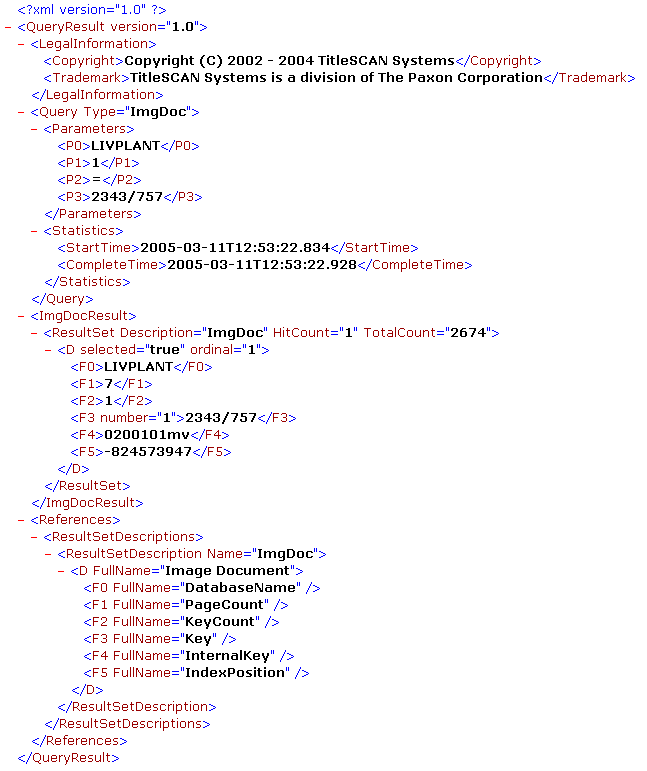
The following samples illustrate how to directly retrieve image document information for an image document independent of any plant document. Referring back to our list of functions in the section titled Primary DAO Functions, the web service call is 'GetImageDocument' and that is shown in the first example below. In the second example, the DAO Page request has 'QueryName=ImageDocument' immediately following the question mark in the query statement.

NOTE:
'DAODataService' in the above example
is the name given to a web reference. Please
refer to the section Using DAO Web
Services which describes creating the web reference. Also
note that the Token parameter above will need to be obtained via a call
to the 'DAOLoginService' (see
the User Authentication Parameters
section).
http://tsweb.titlescan.com/Query.aspx?QueryName=ImageDocument&UserName=tsweb&UserCompany=tss&UserPassword=anywhere&DatabaseName=LIVPLANT&KeyNumber=1&KeyRelation==&KeyValue=2343/757
 IMPORTANT:
The UserName,
UserCompany, and UserPassword parameters shown in the sample query above
are example values only and will not work. If
you are developing software that uses the TitleSCAN Direct Access Option
and wish to test that software using the TitleSCAN Web demonstration site
at http://tsweb.titlescan.com, contact TitleSCAN Systems to obtain an
account on that system. When
you obtain the account, you will be given UserName, UserCompany, and UserPassword
values. Substitute
those values in the Query string above.
IMPORTANT:
The UserName,
UserCompany, and UserPassword parameters shown in the sample query above
are example values only and will not work. If
you are developing software that uses the TitleSCAN Direct Access Option
and wish to test that software using the TitleSCAN Web demonstration site
at http://tsweb.titlescan.com, contact TitleSCAN Systems to obtain an
account on that system. When
you obtain the account, you will be given UserName, UserCompany, and UserPassword
values. Substitute
those values in the Query string above.
The following is the XML result set. The DAO Web Service request or the DAO Page Request will return this same result set.